There is already a wealth of articles, talks, and videos about Swift Concurrency. This series is my attempt to bring the subject together and give it a clear structure, drawing on my own knowledge and experience.
I want to connect the individual topics into a story we can follow step by step: why each idea exists, how it works, and how it fits into everyday Swift code. Along the way, we'll work through examples, examine their results, and use them to make the behavior easier to understand.
We'll begin with structured concurrency because it addresses a question that comes before the details of syntax: when several things are happening at once, how do we keep their work together?
An app rarely finishes one piece of work before starting the next. It waits for a server while the interface stays responsive, prepares images while someone keeps scrolling, or saves a document while another action is already underway. Letting operations overlap is a normal part of building software.
The difficult part often appears later, when the reason for starting that work has changed.
Consider a search field. Someone types a query, then replaces it before the first request returns. The app now has two searches in progress, but only one answer is relevant. We need a way to stop work we no longer need and decide what to do with results that still arrive.
Or consider importing a folder of photos. Several files can be read and processed together. If the import fails halfway through, the application needs to bring the remaining work to an orderly end before reporting that the operation is over.
Even loading a screen raises the same questions. Several requests may contribute to one result, but they finish at different times. The screen may close before they are ready. One request may fail while others are still running. We have to decide which work belongs together, who waits for it, and who is responsible for stopping it.
These situations look different in the interface. In the code, they share a problem: several pieces of work belong to one larger operation, but their lifetimes can drift apart.
Why starting work wasn't enough
On Apple platforms, dispatch queues, completion handlers, and operations have long given us ways to run and coordinate concurrent work. We can group requests, arrange dependencies, retain handles, and build cancellation into our own services.
As an operation grows, so does the bookkeeping. Completion may be reported in one place, errors handled in another, and cancellation wired through several objects. A function can finish setting up its work while the work itself continues elsewhere. To understand when everything is really over, we have to follow those connections.
Writing the calls with async/await makes the sequence easier to read. But that syntax alone doesn't tell us how several independently running tasks should belong together. Swift's concurrency proposal treats those as separate concerns: asynchronous functions describe work that can suspend, while structured concurrency describes related tasks and their lifetimes. SE-0304
The question becomes: can the structure of the program also show the boundaries of the work it starts?
What is Structured Concurrency?
In this article, we'll focus on how related tasks belong together: who waits for them, how cancellation reaches them, and why their work must finish before the enclosing scope can end.
Swift Concurrency is the larger collection of tools for asynchronous code: async/await, tasks, actors, and the machinery that runs them. Structured concurrency explains how related tasks stay together.
A task represents a piece of work and its lifetime; a thread executes that work when it is ready to run.
A task creates structured children through async let or a task group's addTask. Calling an async function on its own continues the current task. Those children belong to a particular scope: a part of the code enclosed by braces. Before execution can leave that scope, every child must have finished. The same rule applies when something goes wrong. Swift's structured concurrency design
That larger operation could be an import, a collection of requests, or a step in processing a document. Its children can make progress independently, while their scope gives us one place where their work must have ended. We may choose not to use a result, but its task still has to finish before that boundary is crossed.
What does “structured” mean?
With an ordinary function call, the order is familiar: enter the function, do its work, return. The next line runs after the called function has finished.
Callbacks change that picture. A function can start two requests, return, and leave us waiting for their answers somewhere else. We need to connect those answers back to the operation that asked for them.
Structured concurrency lets the work overlap while keeping a clear place where it must end. Swift gives us async let for a known set of child operations and task groups for creating children dynamically and collecting results as they finish.
How Swift arrived at this model
In 2017, Chris Lattner published the Swift Concurrency Manifesto, outlining a direction for clearer asynchronous code, safer access to shared state, and compatibility with existing APIs. It was a vision for the wider model; the structured task-lifetime rules were proposed separately later.
Swift could build on experience from other languages. C# 5.0 introduced async/await in 2012, and JavaScript later adopted async functions built on promises. Both showed how asynchronous steps could read like a sequence again. Lattner explicitly referenced their approaches in the manifesto. C# history, V8's explanation of async functions
That syntax addressed readability. Other work explored how to keep concurrent operations within a shared lifetime: Martin Sústrik's libdill for C, Nathaniel J. Smith's Trio for Python, and Kotlin's coroutine scopes. Trio's nursery, for example, cannot be left while its tasks remain unfinished. Sústrik's explanation, Smith's 2018 essay, Kotlin's documentation
Swift's October 2020 structured concurrency pitch also used the term nursery, later replaced by task group. The accepted model shipped in Swift 5.5, alongside async/await. These are complementary ideas: one makes asynchronous control flow readable; the other gives related tasks a shared boundary. Initial pitch, SE-0304
Meet the example
To make those relationships visible, we'll use a profile screen that loads a user and their posts. It gives us two independent requests with different result types, while staying small enough to follow from beginning to end. By changing a delay or a response, we can explore success, failure, and cancellation without changing the overall operation.
Our sample user is John Doe, and his profile has two posts. We'll make the user response arrive after 100 milliseconds and the posts response after one second. That gap will help us see what the parent and each child are doing.
The data is prepared JSON, so every run has the same starting point. Here's the user response:
{
    "id": 1,
    "name": "John Doe",
    "email": "john.doe@example.com"
}
The posts response contains two entries:
[
    {
        "id": 0,
        "userId": 1,
        "title": "Learning Swift Concurrency",
        "body": "Exploring how child tasks work."
    },
    {
        "id": 1,
        "userId": 1,
        "title": "Understanding cancellation",
        "body": "Cancellation is cooperative."
    }
]
Each post's userId matches John's id. We already know that ID in this example, so both requests can start together; neither needs to wait for the other's response.
MockData.user and MockData.posts contain the JSON and the delays. User and Post describe the decoded values; Profile brings them together.
These values are also Sendable, which allows them to pass safely between the tasks used here. That addresses a separate concern from task lifetime. Keeping work together doesn't, on its own, make it safe for several tasks to change the same shared data.
Our service keeps the two responses as userResponse and postsResponse. The data will stay the same as we change how the requests are managed.
Follow the colors
The logs use a small color key to make the sequence easier to follow. Each line begins with [mm:ss.mmm]: minutes, seconds, and milliseconds since the first logged event in the run. All scenarios on the page share that timeline, so later excerpts start at a nonzero time. The clock measures elapsed time; its three decimal places do not promise exact scheduling to the millisecond.
- 🟣 SCHEDULED — work has been scheduled.
- 🔵 RUNNING — this part of the code is running.
- ▫️ WAIT — the next step is to await an answer or a delay.
- 🟢 DONE — this request or step has finished.
- 🟠 CANCEL REQUEST / CANCELLED — distinguish requesting cancellation from a child responding to it.
- 🔴 FAILED — this request or its caller has received an error.
- ⚪ NOTE — context, such as a function returning a task handle.
Think of these labels as signposts. A WAIT line is printed just before an await; it doesn't prove the task actually paused. A DONE line means the named step ended, which can still be followed by an error elsewhere. The words carry the meaning even when the colors aren't visible.
1. Start with callbacks
Let's begin with the callback approach. A request starts now and hands back its answer later. Our MockManager.request helper waits for the chosen delay, decodes the JSON, and delivers a Result on the main actor. GCD's asyncAfter schedules that later work without keeping a thread asleep.
The service's job is to bring those two answers together. We'll look at that first; the full request helpers are at the end if you'd like to see how the simulation works.
Now add a method that waits for both callbacks:
@MainActor
public func loadProfile(
    completion: @escaping @MainActor @Sendable (Result<Profile, Error>) -> Void
) {
    ExampleLog.write(.running, "[GCD:profile] coordinating requests")
    let group = DispatchGroup()
    var userResult: Result<User, Error>?
    var postsResult: Result<[Post], Error>?

    group.enter()
    MockManager.request(userResponse) { result in
        defer { group.leave() }
        userResult = result
    }

    group.enter()
    MockManager.request(postsResponse) { result in
        defer { group.leave() }
        postsResult = result
    }

    group.notify(queue: .main) {
        ExampleLog.write(.completed, "[GCD:profile] both callbacks finished")
        guard let userResult, let postsResult else {
            preconditionFailure("Each request must store a result before leaving the group")
        }

        completion(
            Result {
                try Profile(user: userResult.get(), posts: postsResult.get())
            }
        )
    }
}
The dispatch group keeps a count of unfinished requests. Each request enters once and leaves after storing its answer. Both answers are collected on the main actor, so these updates happen one at a time.
Once the count reaches zero, notify can build the profile. Result.get() gives us the value if the request succeeded, or throws its stored error. The surrounding Result catches that error and passes it to the completion handler.
The function returns before the result arrives
From a main-actor context, call the service and print a message immediately afterward:
let service = ProfileService()

service.loadProfile { result in
    switch result {
    case .success(let profile):
        ExampleLog.write(.completed, "User: \(profile.user.name)")
        ExampleLog.write(.completed, "Posts: \(profile.posts.count)")
    case .failure(let error):
        ExampleLog.write(.failed, "Failed: \(error)")
    }
}

ExampleLog.write(.note, "[GCD] loadProfile returned; requests may still be pending")
The beginning of a captured run is:
[00:00.000] 🔵 RUNNING [GCD:profile] coordinating requests
[00:00.000] 🟣 SCHEDULED [GCD:user] scheduled
[00:00.000] 🟣 SCHEDULED [GCD:posts] scheduled
[00:00.000] ⚪ NOTE [GCD] loadProfile returned; requests may still be pending
Both requests are now on their way, but the function has already returned. The caller doesn't have a profile yet. That answer will arrive through the completion handler.
The group collects both results
After the simulated delays, the same run continues:
[00:00.103] 🟢 DONE [GCD:user] decoded response
[00:01.048] 🟢 DONE [GCD:posts] decoded response
[00:01.048] 🟢 DONE [GCD:profile] both callbacks finished
[00:01.048] 🟢 DONE User: John Doe
[00:01.048] 🟢 DONE Posts: 2
The user arrives first. That's only half of the answer, so the group keeps waiting. When the posts arrive too, notify brings the values together and the caller receives the profile.
Everything works, but look at what we had to keep track of: a group, two places to store answers, and a callback for the final result. Together, they tell us when the work is really over. Returning from loadProfile only tells us that the requests have been started.
2. Keep the requests together
Now give the requests a shared parent. Here is the same profile operation using async let:
public func loadProfileStructuredWay() async throws -> Profile {
    ExampleLog.write(.running, "[profile] creating child tasks")
    async let user = MockManager.asyncRequest(userResponse)
    async let posts = MockManager.asyncRequest(postsResponse)

    ExampleLog.write(.waiting, "[profile] waiting for user")
    let loadedUser = try await user
    ExampleLog.write(.waiting, "[profile] received user; waiting for posts")
    let loadedPosts = try await posts
    ExampleLog.write(.completed, "[profile] both children finished; returning profile")
    return Profile(user: loadedUser, posts: loadedPosts)
}
The first async let starts a child for the user. The second starts a child for the posts. Neither request needs to wait for the other to begin.
The parent asks for the user first and posts second. That is the order in which it reads the answers, not the order in which the requests start. Both children are already in progress.
From an async context, the caller can use an ordinary return value:
do {
    let profile = try await service.loadProfileStructuredWay()
    ExampleLog.write(.completed, "User: \(profile.user.name)")
    ExampleLog.write(.completed, "Posts: \(profile.posts.count)")
} catch {
    ExampleLog.write(.failed, "Failed: \(error)")
}
Both children start, and the parent waits
Here is the beginning of a captured run:
[00:01.048] 🔵 RUNNING [profile] creating child tasks
[00:01.048] ▫️ WAIT [profile] waiting for user
[00:01.048] 🔵 RUNNING [async:posts] started
[00:01.048] ▫️ WAIT [async:posts] waiting for response
[00:01.048] 🔵 RUNNING [async:user] started
[00:01.048] ▫️ WAIT [async:user] waiting for response
In this run, the parent reaches try await user before the user is ready. It pauses there while the children carry on.
Your first few lines may appear in a different order. A child can begin before or after the parent prints its waiting message. What stays the same is the relationship: the parent creates both children before asking for their results.
It's easy to miss one detail here: calling an async function doesn't create a new task. The caller continues inside loadProfileStructuredWay() as the same task. The two async let declarations are where the children are created. The async let design
The user becomes available
After the user delay, the captured run continues:
[00:01.152] 🔵 RUNNING [async:user] resumed; decoding
[00:01.152] 🟢 DONE [async:user] completed
[00:01.152] ▫️ WAIT [profile] received user; waiting for posts
The user's wait is over. Its child continues, decodes the JSON, and finishes. The parent can now take that answer and move on to posts.
There is no second start for posts and no fresh one-second delay. That request has been underway since the second async let. The parent is simply catching up with work it already started.
The waiting message helps us follow the example. It marks where the code is about to wait, rather than the precise moment the runtime pauses the task.
The posts become available
The remaining output is:
[00:02.082] 🔵 RUNNING [async:posts] resumed; decoding
[00:02.082] 🟢 DONE [async:posts] completed
[00:02.082] 🟢 DONE [profile] both children finished; returning profile
[00:02.082] 🟢 DONE User: John Doe
[00:02.082] 🟢 DONE Posts: 2
Finally, the posts arrive. Their child finishes decoding, and the parent has everything it needs. It creates Profile and returns it in the usual way.
Here is the rule that makes this more than shorter syntax: the profile function cannot finish while either child is still running. The operation's end is part of its structure.
3. What if we don't need both answers?
So far, we have carefully awaited both answers. Perhaps that's all that keeps the example tidy? To find out, let's stop using the posts result.
Create both requests inside a do block, use only the user, and let execution leave the block:
public static func loadUserOnly() async throws -> User {
    let loadedUser: User

    do {
        async let user = MockManager.asyncRequest(MockData.user)
        async let _ = MockManager.asyncRequest(MockData.posts)

        loadedUser = try await user
        ExampleLog.write(.note, "[scope] leaving inner block without reading posts")
    }

    ExampleLog.write(.completed, "[scope] inner block finished; function continues")
    return loadedUser
}
Writing async let _ starts the posts child but says we won't use its value. The do block gives both children a smaller home inside the function. We take the user result, reach the closing brace, and then try to continue.
The caller awaits the function and prints the returned user:
let user = try await ScopeExamples.loadUserOnly()
ExampleLog.write(.completed, "[caller] received user: \(user.name)")
The captured output is:
[00:03.448] 🔵 RUNNING [async:user] started
[00:03.448] ▫️ WAIT [async:user] waiting for response
[00:03.448] 🔵 RUNNING [async:posts] started
[00:03.448] ▫️ WAIT [async:posts] waiting for response
[00:03.548] 🔵 RUNNING [async:user] resumed; decoding
[00:03.549] 🟢 DONE [async:user] completed
[00:03.549] ⚪ NOTE [scope] leaving inner block without reading posts
[00:03.549] 🟠 CANCELLED [async:posts] cancelled
[00:03.549] 🟢 DONE [scope] inner block finished; function continues
[00:03.549] 🟢 DONE [caller] received user: John Doe
Watch the space between the two scope messages. We announce that we're leaving, but posts are still waiting. Swift requests their cancellation and waits for that child to finish. Only then does the next message appear.
Nothing failed, and we never called cancel(). We simply reached the end of the block. The surrounding function can continue because the work that belonged to that block has been dealt with.
Every child must finish; every result does not have to be used. That waiting still matters if a child ignores cancellation: leaving the block can take longer. And if a result or its error matters to your program, explicitly await it. Automatic cleanup doesn't replace reading the answer. The scope rules for async let
4. When one request fails
Real requests don't always bring back the answer we expected. Let's give the user an invalid ID and see what happens to the request that's still waiting:
{
    "id": "not-an-integer",
    "name": "John Doe",
    "email": "john.doe@example.com"
}
User.id expects an Int, so decoding must fail. The invalid fixture retains the 100-millisecond delay; posts still take one second.
let failingService = ProfileService(userResponse: MockData.invalidUser)
The GCD version waits for both callbacks
Call failingService.loadProfile with the same completion handler as before. The captured output is:
[00:02.082] 🔵 RUNNING [GCD:profile] coordinating requests
[00:02.082] 🟣 SCHEDULED [GCD:invalid-user] scheduled
[00:02.082] 🟣 SCHEDULED [GCD:posts] scheduled
[00:02.186] 🔴 FAILED [GCD:invalid-user] decoding failed: DecodingError.typeMismatch: expected value of type Int. Path: id. Debug description: Expected to decode Int but found a string instead.
[00:03.131] 🟢 DONE [GCD:posts] decoded response
[00:03.131] 🟢 DONE [GCD:profile] both callbacks finished
[00:03.131] 🔴 FAILED Failed: DecodingError.typeMismatch: expected value of type Int. Path: id. Debug description: Expected to decode Int but found a string instead.
The user request has failed, but the dispatch group is still waiting for posts. Once posts finish, the group reads the saved answers and reports the user's error.
The group knows when both callbacks are done. We haven't given it a rule for stopping the other request when one fails. Adding that behavior would mean writing more coordination code.
The structured version cleans up its child
Call the async method on the same failing service:
do {
    _ = try await failingService.loadProfileStructuredWay()
} catch {
    ExampleLog.write(.failed, "Failed: \(error)")
}
The captured output is:
[00:03.131] 🔵 RUNNING [profile] creating child tasks
[00:03.131] ▫️ WAIT [profile] waiting for user
[00:03.131] 🔵 RUNNING [async:invalid-user] started
[00:03.131] ▫️ WAIT [async:invalid-user] waiting for response
[00:03.131] 🔵 RUNNING [async:posts] started
[00:03.131] ▫️ WAIT [async:posts] waiting for response
[00:03.235] 🔵 RUNNING [async:invalid-user] resumed; decoding
[00:03.235] 🔴 FAILED [async:invalid-user] failed: DecodingError.typeMismatch: expected value of type Int. Path: id. Debug description: Expected to decode Int but found a string instead.
[00:03.235] 🟠 CANCELLED [async:posts] cancelled
[00:03.235] 🔴 FAILED Failed: DecodingError.typeMismatch: expected value of type Int. Path: id. Debug description: Expected to decode Int but found a string instead.
The last three events tell the story: the user request fails, posts respond to cancellation, and the caller receives the error. We leave no posts request running behind us.
The parent is waiting at try await user. That line throws, and the error takes execution out of the scope. Before it can leave, Swift cancels the outstanding posts child and waits for it. The same boundary that held the work together on success also applies on failure. Scope exit and error propagation
The timing deserves a closer look. A child's error doesn't immediately stop every sibling. Here, the parent receives the error and leaves the scope; that exit triggers cleanup. If we catch the error inside the scope, or read the results in another order, the sequence can change.
An error can happen before the parent observes it
Let's make that difference visible. This time the user is slow: one second. Posts fail after just 100 milliseconds. The parent still asks for the user first.
let reverseFailure = ProfileService(
    userResponse: MockData.slowUser,
    postsResponse: MockData.invalidPosts
)

do {
    _ = try await reverseFailure.loadProfileStructuredWay()
} catch {
    ExampleLog.write(.failed, "[caller] observed error: \(error)")
}
Here, invalidPosts contains {} where an array is expected. The captured output is:
[00:03.549] 🔵 RUNNING [profile] creating child tasks
[00:03.549] ▫️ WAIT [profile] waiting for user
[00:03.549] 🔵 RUNNING [async:slow-user] started
[00:03.549] ▫️ WAIT [async:slow-user] waiting for response
[00:03.549] 🔵 RUNNING [async:invalid-posts] started
[00:03.549] ▫️ WAIT [async:invalid-posts] waiting for response
[00:03.656] 🔵 RUNNING [async:invalid-posts] resumed; decoding
[00:03.656] 🔴 FAILED [async:invalid-posts] failed: DecodingError.typeMismatch: expected value of type Array<Any>. Debug description: Expected to decode Array<Any> but found a dictionary instead.
[00:04.607] 🔵 RUNNING [async:slow-user] resumed; decoding
[00:04.607] 🟢 DONE [async:slow-user] completed
[00:04.607] ▫️ WAIT [profile] received user; waiting for posts
[00:04.607] 🔴 FAILED [caller] observed error: DecodingError.typeMismatch: expected value of type Array<Any>. Debug description: Expected to decode Array<Any> but found a dictionary instead.
Posts have already failed, but the parent hasn't asked for their answer yet. It is still waiting for the user. The user finishes normally; only when the parent reaches try await posts does the caller see the earlier error.
An error happening and an error being received are two different moments. The first example made them look almost simultaneous. This one shows the gap. Later, we'll use a task group when we want answers as soon as they're ready.
5. When we no longer need the result
Sometimes nothing goes wrong with the data. We simply no longer need it—perhaps the person using our app has left the screen. A task handle lets us request cancellation:
let operation = Task {
    try await service.loadProfileStructuredWay()
}

try await Task.sleep(for: .milliseconds(200))
ExampleLog.write(.cancellationRequested, "[caller] requesting parent cancellation")
operation.cancel()

do {
    _ = try await operation.value
} catch is CancellationError {
    ExampleLog.write(.cancelled, "[caller] cancellation received after child cleanup")
}
We give the operation about 200 milliseconds before asking it to stop. With these sample delays, the user is usually ready by then, while posts are still waiting.
The excerpt keeps the main sequence visible. The full runner also handles cancellation of its own short delay and unexpected errors, making sure the operation it starts is awaited.
The captured run shows:
[00:03.235] 🔵 RUNNING [profile] creating child tasks
[00:03.236] ▫️ WAIT [profile] waiting for user
[00:03.236] 🔵 RUNNING [async:user] started
[00:03.236] ▫️ WAIT [async:user] waiting for response
[00:03.236] 🔵 RUNNING [async:posts] started
[00:03.236] ▫️ WAIT [async:posts] waiting for response
[00:03.342] 🔵 RUNNING [async:user] resumed; decoding
[00:03.342] 🟢 DONE [async:user] completed
[00:03.342] ▫️ WAIT [profile] received user; waiting for posts
[00:03.447] 🟠 CANCEL REQUEST [caller] requesting parent cancellation
[00:03.448] 🟠 CANCELLED [async:posts] cancelled
[00:03.448] 🟠 CANCELLED [caller] cancellation received after child cleanup
The parent is waiting for posts when the request to stop arrives. Posts are sleeping, and Task.sleep responds by throwing CancellationError. The child finishes its cleanup before the caller reports cancellation.
Cancellation asks work to stop. It doesn't interrupt arbitrary code on the spot. Tasks need to respond to the request, either by checking for cancellation or by using an API such as Task.sleep that already does so.
A child that ignores the request can keep running, and the enclosing scope still has to wait. Our checks make the stopping points visible. They don't interrupt JSON decoding halfway through.
There are two kinds of task in this example. We manage operation ourselves through its handle. Inside it, the two requests are structured children. Writing one Task inside another task doesn't create that child relationship automatically.
6. A task that keeps going
Braces can make two pieces of code look connected without connecting their lifetimes. Here is a function that starts a Task and immediately hands its handle back to the caller:
public static func startPostsTask() -> Task<[Post], Error> {
    let task = Task {
        try await MockManager.asyncRequest(MockData.posts)
    }

    ExampleLog.write(.note, "[unstructured] returning the task handle")
    return task
}
Use the handle to observe the result:
let postsTask = ScopeExamples.startPostsTask()
ExampleLog.write(.note, "[caller] startPostsTask returned")
let posts = try await postsTask.value
ExampleLog.write(.completed, "[caller] explicitly awaited \(posts.count) posts")
The captured output is:
[00:04.607] ⚪ NOTE [unstructured] returning the task handle
[00:04.607] ⚪ NOTE [caller] startPostsTask returned
[00:04.607] 🔵 RUNNING [async:posts] started
[00:04.607] ▫️ WAIT [async:posts] waiting for response
[00:05.673] 🔵 RUNNING [async:posts] resumed; decoding
[00:05.673] 🟢 DONE [async:posts] completed
[00:05.673] 🟢 DONE [caller] explicitly awaited 2 posts
The function is already gone, but its posts request is still running. We keep the handle and wait for it ourselves, so the demonstration doesn't end before the result arrives.
A new Task can pick up details from where it was created, including priority, task-local values, and actor isolation. But that doesn't bind its life to the creator's scope. Cancelling the creator doesn't automatically cancel this task, and awaiting .value doesn't add that relationship afterward. Unstructured tasks and context inheritance
Task.detached also creates an unstructured task, with different context-inheritance rules. Neither form becomes a structured child just because it appears inside another task. We'll explore those differences separately.
This independence can be useful when starting async work from synchronous code or deliberately managing a separate operation. It also gives us responsibilities: keep track of the handle, decide when to cancel, and deal with errors. When work belongs inside an existing async operation, structured children give us those lifetime boundaries directly.
7. When two requests become many
Two named answers are a natural fit for async let: one user and one list of posts. But suppose the number of requests comes from an array at runtime. Or suppose we want to handle the next available answer, whichever request produced it. That's where a task group becomes useful.
We can stay with our posts example. Pass in an array of prepared responses, start one child for each, and collect the batches as they arrive:
public static func loadPostBatches(
    _ responses: [MockResponse<[Post]>]
) async throws -> [[Post]] {
    let batches = try await withThrowingTaskGroup(of: [Post].self) { group in
        for response in responses {
            group.addTask {
                try await MockManager.asyncRequest(response)
            }
        }

        var results: [[Post]] = []
        for try await batch in group {
            ExampleLog.write(.completed, "[group] received a batch with \(batch.count) posts")
            results.append(batch)
        }
        return results
    }

    ExampleLog.write(.completed, "[group] scope finished")
    return batches
}
Call it with the slower response first:
let batches = try await ScopeExamples.loadPostBatches([
    MockData.slowPosts,
    MockData.fastPosts
])
ExampleLog.write(.completed, "[caller] batches: \(batches.count)")
Each test response contains the same two posts. We're comparing two independent batches of prepared data, rather than fetching distinct pages. One takes 200 milliseconds; the other takes 50.
The captured output is:
[00:05.673] 🔵 RUNNING [async:fast-posts] started
[00:05.673] ▫️ WAIT [async:fast-posts] waiting for response
[00:05.673] 🔵 RUNNING [async:slow-posts] started
[00:05.673] ▫️ WAIT [async:slow-posts] waiting for response
[00:05.727] 🔵 RUNNING [async:fast-posts] resumed; decoding
[00:05.727] 🟢 DONE [async:fast-posts] completed
[00:05.727] 🟢 DONE [group] received a batch with 2 posts
[00:05.885] 🔵 RUNNING [async:slow-posts] resumed; decoding
[00:05.885] 🟢 DONE [async:slow-posts] completed
[00:05.885] 🟢 DONE [group] received a batch with 2 posts
[00:05.885] 🟢 DONE [group] scope finished
[00:05.885] 🟢 DONE [caller] batches: 2
We added the slow request first, but the fast one delivers the first answer. The loop can use that answer straight away. It doesn't have to wait for the earlier request before reading the later one.
This is a useful difference from asking for two named async let values in a chosen order. A group's results arrive in completion order, so their order may differ from the input array.
The group still brings all of its children to an end before it returns. On a normal exit it waits for any remaining children without automatically cancelling them. If an error escapes this throwing group's body, it cancels and awaits the remaining work. In our example, iterating the group is how we receive a child's error. Task group lifetime and errors
When the first answer is enough
What if we need only one answer? Imagine asking two sources for the same data and using whichever replies first. Our two prepared responses contain identical posts, so we can try that without introducing another service.
Instead of collecting every batch, ask group.next() for the next completed result. Once we have it, request cancellation of the remaining work:
public static func firstPostBatch(
    _ responses: [MockResponse<[Post]>]
) async throws -> [Post]? {
    let first = try await withThrowingTaskGroup(of: [Post].self) { group in
        for response in responses {
            group.addTask {
                try await MockManager.asyncRequest(response)
            }
        }

        let first = try await group.next()
        if first != nil {
            ExampleLog.write(.completed, "[race] received the first batch")
        }
        ExampleLog.write(.cancellationRequested, "[race] requesting cancellation of remaining work")
        group.cancelAll()
        ExampleLog.write(.note, "[race] returning from the group body")
        return first
    }

    ExampleLog.write(.completed, "[race] group scope finished")
    return first
}
Call it with the one-second response and the 50-millisecond response:
if let posts = try await ScopeExamples.firstPostBatch([
    MockData.posts,
    MockData.fastPosts
]) {
    ExampleLog.write(.completed, "[caller] first batch: \(posts.count) posts")
}
Here is a captured run:
[00:05.885] 🔵 RUNNING [async:posts] started
[00:05.885] ▫️ WAIT [async:posts] waiting for response
[00:05.886] 🔵 RUNNING [async:fast-posts] started
[00:05.886] ▫️ WAIT [async:fast-posts] waiting for response
[00:05.940] 🔵 RUNNING [async:fast-posts] resumed; decoding
[00:05.940] 🟢 DONE [async:fast-posts] completed
[00:05.940] 🟢 DONE [race] received the first batch
[00:05.940] 🟠 CANCEL REQUEST [race] requesting cancellation of remaining work
[00:05.940] ⚪ NOTE [race] returning from the group body
[00:05.940] 🟠 CANCELLED [async:posts] cancelled
[00:05.940] 🟢 DONE [race] group scope finished
[00:05.940] 🟢 DONE [caller] first batch: 2 posts
First, the fast request finishes and the group receives its batch. We now have the answer we need, but the slower request is still waiting.
Next, cancelAll() asks the remaining work to stop. It doesn't forcibly end that work or wait for it on that line. Our slow request responds because its sleep supports cancellation.
Finally, look at the last four lines. Returning from the group's body doesn't immediately return from withThrowingTaskGroup. The slow child finishes first; only then do we print “group scope finished” and deliver the posts to the caller. We have stopped collecting answers, but we haven't abandoned responsibility for the tasks.
Without cancelAll(), a normal return would still wait for the slower request to finish its full delay. With it, we can avoid unnecessary work—but a child that ignores cancellation can still delay the return. Task group cancellation
This example takes the first result it receives, not the first successful result after ignoring failures. If next() receives an error, it throws, and the escaping error triggers group cleanup. An empty group returns nil.
The task family carries other useful information, too, such as priority and task-local values. Those are subjects for another article. One detail to keep in mind now: being a child doesn't, by itself, promise execution on the parent's actor.
Read the whole picture
The profile example gives us two things to follow: who is still responsible for the work, and when a thread is actually needed to run it. The diagram puts them alongside each other.
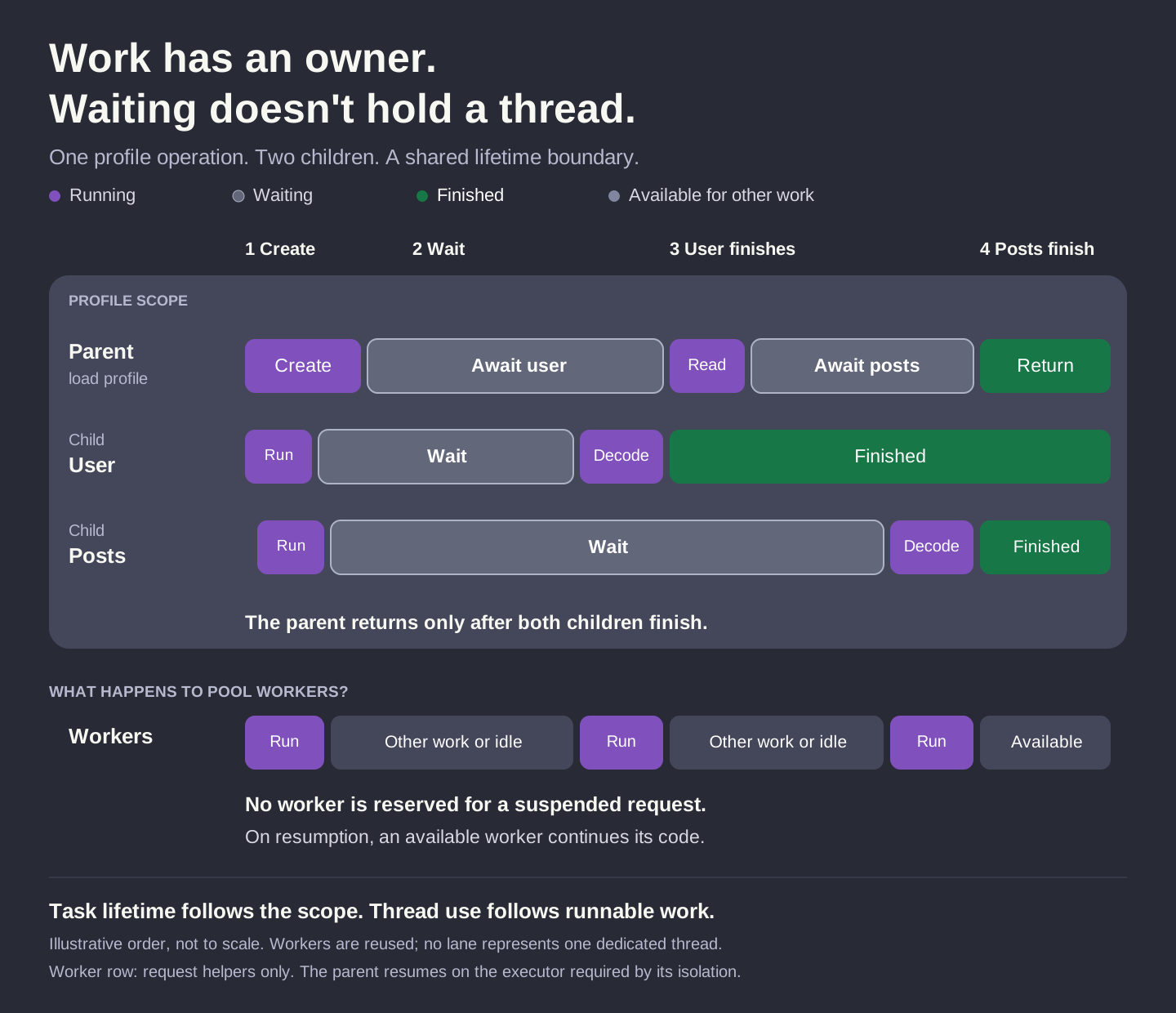
Read the upper part from left to right:
- Create. The parent creates the user and posts children. Each begins its request independently.
- Wait. The parent awaits the user. Both children can suspend during their simulated response delays.
- Receive the user. The user child resumes, decodes, and finishes. The parent receives that value and awaits the already-started posts child.
- Return. Posts resume, decode, and finish. Only now does the parent have both results and return the profile.
Everything inside the upper frame belongs to the profile operation. The parent can take its final step only after both children have finished.
Now look at the workers below. While a request waits, its task has nothing to execute. No worker has to stay beside it. That worker can pick up something else, or become idle. When the request is ready to continue, an available worker runs its next piece of code.
The drawing follows a successful run. It isn't a stopwatch: the widths don't show real durations, and the workers row isn't one dedicated thread. A request may continue on a different physical thread. The parent returns to the executor required by its isolation.
Our helper uses @concurrent to make its execution off the caller's actor explicit; this spelling needs Swift 6.2 or newer. Just marking a function async doesn't promise background work.
Likewise, await doesn't always mean a pause. If a result is already ready, execution may continue. And once JSON decoding starts, it uses its executing thread like other synchronous code. These details explain how work runs; the scope explains when that work must be finished. Apple's runtime walkthrough
Check your understanding
Before moving on, try answering these questions from the examples:
- Does calling an async function create a new task?
- What happens when an inner block containing an unused
async letfinishes? - Must every child result be read explicitly?
- If posts fail while the parent is awaiting a slow user, when does the parent observe the error?
- Does
cancel()guarantee an immediate return? - Does awaiting
Task.valuemake that task a structured child? - When would a task group be a better fit than two
async letdeclarations? - Does returning the first result from a group let the caller continue before its other children finish?
An ordinary async call continues the current task. An unused async let is still cancelled and awaited before its scope ends. The parent receives a child's error when it asks for that result, and an escaping error waits for child cleanup before reaching the caller.
Cancellation needs cooperation. Awaiting an independent task doesn't make it a structured child. A task group helps when the number of requests varies or when we want to collect answers as they finish. Even after its body returns a first result, the group must wait for its remaining children to finish.
Request helpers used by the examples
Here are the full request helpers behind the examples. They let us choose a delay and decode prepared JSON, so we can watch the same operation under different conditions. Each MockResponse holds the JSON, a name for its log messages, and its delay.
Callback request
public static func request<Value>(
    _ response: MockResponse<Value>,
    completion: @escaping @MainActor @Sendable (Result<Value, Error>) -> Void
) {
    ExampleLog.write(.scheduled, "[GCD:\(response.name)] scheduled")

    DispatchQueue.global().asyncAfter(
        deadline: .now() + .milliseconds(response.delayMilliseconds)
    ) {
        let result = Result<Value, Error> {
            try JSONDecoder().decode(Value.self, from: Data(response.json.utf8))
        }
        switch result {
        case .success:
            ExampleLog.write(.completed, "[GCD:\(response.name)] decoded response")
        case .failure(let error):
            ExampleLog.write(.failed, "[GCD:\(response.name)] decoding failed: \(error)")
        }

        DispatchQueue.main.async {
            completion(result)
        }
    }
}
The callback helper decodes once and brings its answer back to the main actor. That's where our service collects both results one at a time. The dispatch group counts unfinished work; it doesn't protect those stored values from concurrent access on its own.
Async request
@concurrent
public static func asyncRequest<Value>(
    _ response: MockResponse<Value>
) async throws -> Value {
    ExampleLog.write(.running, "[async:\(response.name)] started")

    do {
        try Task.checkCancellation()
        ExampleLog.write(.waiting, "[async:\(response.name)] waiting for response")
        try await Task.sleep(for: .milliseconds(response.delayMilliseconds))
        try Task.checkCancellation()
        ExampleLog.write(.running, "[async:\(response.name)] resumed; decoding")

        let value = try JSONDecoder().decode(
            Value.self,
            from: Data(response.json.utf8)
        )
        ExampleLog.write(.completed, "[async:\(response.name)] completed")
        return value
    } catch is CancellationError {
        ExampleLog.write(.cancelled, "[async:\(response.name)] cancelled")
        throw CancellationError()
    } catch {
        ExampleLog.write(.failed, "[async:\(response.name)] failed: \(error)")
        throw error
    }
}
In the async helper, the task can pause during the sleep and give up its worker. The cancellation checks make its stopping points explicit; the sleep itself also responds to cancellation. When the task continues, decoding is ordinary synchronous work. The log messages help us follow these steps without pretending to show every decision the runtime makes.
Explore further
The complete sample includes the models, prepared JSON, and all ten scenarios. The full captured output preserves their shared timeline. The output above was captured from the sample; startup order and error wording can vary between runs and toolchains.
For more on the language model, see Apple's Explore structured concurrency in Swift and the structured concurrency proposal.